
Some times we make mistakes when adding friends on Facebook. We wrongly add some friends and then think that we should not add them as friend. Then we have to cancel or undo our pending/awaiting friend requests so that our friend request will not be sent or pending to him! But it may be hard to find the list of pending requests!
How to Cancel All Pending Friend Requests you Sent
1. First go to the page where all pending requests are listed on Facebook. Here, Facebook will provide you the list of all pending requests you sent!
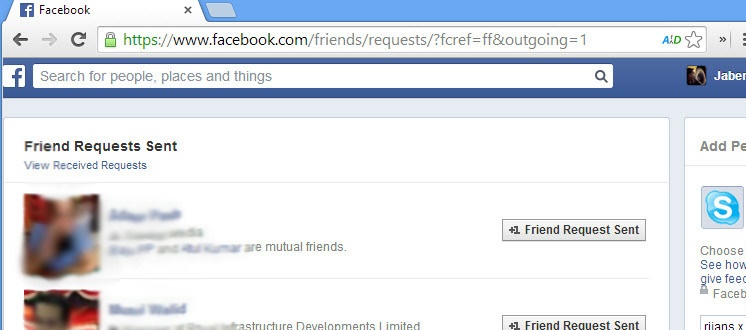
2. No hover your cursor over “Friend Request Sent” button. From the drop-down menu, hit “Cancel Request”.
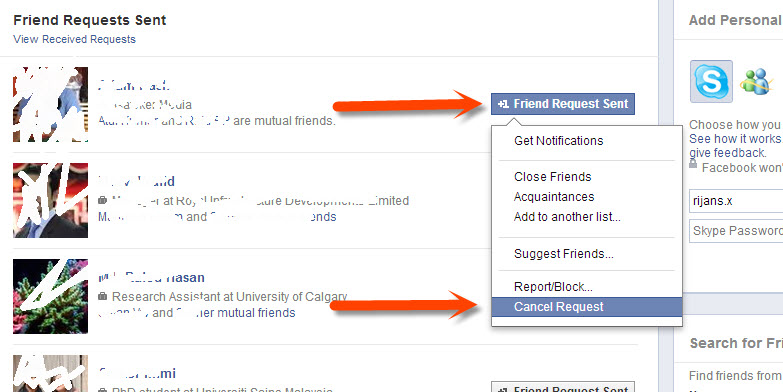
Also follow the confirmation windows if shown. That’s it! You are done! You can also cancel friend request by visiting specific person’s profile. Let us know if you have any problem canceling any request sent by you!

Author: Jaber Al Nahian
Jaber is a Programmer and Tech Enthusiast Geek from Dhaka, Bangladesh. He is the founder and Chief-Editor of TechGainer. While he is away from his keyboard, either he's fishing or messing with wildlife. In case, you can contact him at rijans[at]techgainer[dot]com.
Hi, i think that i saw you visited my blog so here i am!.I am looking for ways to add things to my website!I suppose its ok to use some of your ideas!!
When i visit a blog, chances are that I notice that most blogs are amateurish. On the contrary,I could honestly say that you writting is decent and your website solid.
There are times that i dont read more than two lines but i think you can add some value. Cheers !
Im impressed. I dont think Ive met anyone who knows as much about this subject as you do. Youre truly well informed and very brilliant. You wrote something that people could understand and made the subject intriguing for everyone. Really, great site youve got here.
I hope you never stop! this is one of the best blogs Ive ever read. Youve got some mad skill here, man. I just hope that you dont lose your style because youre definitely one of the coolest bloggers out there. Please keep it up because the internet needs someone like you spreading the word.
How did you make a site look this cool. Email me if you get the chance and share your wisdom. I’d be appreciative.
A helpful article, I just given this onto a friend who was doing a little research on this. And he in fact purchased me dinner because I discovered it for him. :).. So let me reword that: Thank you for the treat! But yeah Thnkx for taking the time to talk about this, I feel strongly about it and love learning more on this topic. If possible, as you gain expertise, would you mind updating your blog with more information? It is highly helpful for me. Big thumb up for this blog post!
Nice post!
tnx
Hi i am having some problems with my fb account.I know my mom password i am going her profile she is not telling me nothing.I have a account i am going in her profile on her profile it is marking Jankey Balwant and at the buttom of that it is marking pending.Will u help me
Here’s quick video tutorial that helped me on how to cancel that friend request: http://www.youtube.com/watch?v=dYSKQTX5aCY