
Nowadays getting hacked in common social networks like Facebook, Twitter, Gmail has become a common situation. So I was thinking to share this important information with you all. First start with a little experience of mine :
Once when I was surfing Facebook, suddenly I was prompted with a Facebook login window inside Facebook. Without entering my login information in that form, I looked around my main Facebook window and I found that I was still logged in! So what’s problem? If I am still logged in. Then why Facebook is asking me to again log in again? I was astonished. But I didn’t take much time to understand that, it’s nothing but a fake login page. Can you guess how did I discover it? I discovered it by checking my URL at the browser address bar. But that fake login page was inside the real Facebook. How it possible? It was possible because it came as a Facebook application. So the URL was looked like “http://apps.facebook.com/<app_name>” . I made a screenshot of the address bar.
See the following:
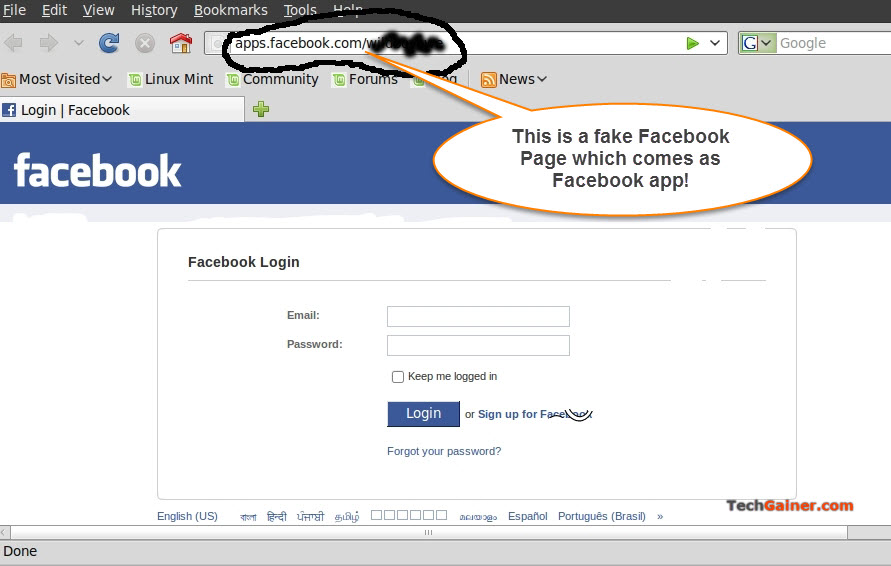
Remember, all third party developed Facebook apps are hosted at the http://apps.facebook.com/ directory and these apps can be developed with external functionality and custom HTML(Facebook modifies this to FBML with some changes of coding). The attacker has made this script as a Facebook app to get usernames and passwords of victims. But I could defend myself because of my consciousness.
This kind of methods of hacking login information is called Phishing. There are also other methods including Keylogging and advanced hacking techniques. Let’s discuss how Phishing works.
How an Attacker can Steal your Facebook Password with Phishing
Here’s a very basic method of typical phishings. Phishings can be done in many dimensions.
- First the hacker will make a fake login script which will look exactly as real/legit page. Here is a sample (link removed as some readers abused it). This sample includes an HTML script script1.html and a PHP file write.php.
- Then he will put the both script1.html and write.php on his own web hosting directory. The attacker is very tricky to give his website/url a confusing name such as http://facebooklogin007.com or http://logintofacebook.110mb.com or http://hackfb.110mb.com/facebook.html something like this so most users wouldn’t notice the URL.
- Now suppose the fake login script is hosted at http://hackfb.110mb.com/facebook.html. Now the attacker(hacker) will send this URL(https://hackfb.110mb.com/facebook.html) to the victims or to the people those he want to hack via Email, app, forum or SMS.
- When the victim come across this page he will have tend to use the link to access Facebook in short way and enter his login information including password.
- Then the password will automatically saved in a new file called passes.txt which was declared in write.php file’s source code .
- The hacker will check the text file to get victim’s password.
That’s the basic way of hacking Facebook accounts by many many bad guys.
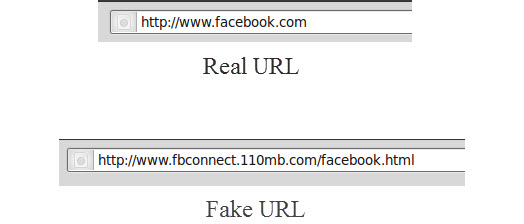
So now you can understand how you should protect yourself from this kind of scams. When you are logging to something (not only for Facebook, but also for other social accounts), please check your URL.
Here are examples of real and fake URLs:
How to Protect Your Facebook Account from being Hacked
Security is not complete without you.
- Get an automatic notification via Email when an Attacker will login to your Facebook account.
- Always try to check your URL(page address) at the address bar of your browser.
- Make you PC secured. Keep your antivirus updated. I recommend Kaspersky, McAfee and Avast. Antivirus programs recognise Keyloggers very well.
- Always maintain an administrator account and another guest or user account on you PC. So your very near enemy will not able to install hidden keylogger on your Computer.
- Don’t click on suspicious links those are sent to your mail inbox, wall, chat box, etc.
- Stick to a renowned browser. I suggest to use Chrome as it comes with phishing and malware protection in built.
Warning: The information provided here should not be used for misusing. If so, we are not responsible for that. We just want to make people a little more conscious by example.

Author: Jaber Al Nahian
Jaber is a Programmer and Tech Enthusiast Geek from Dhaka, Bangladesh. He is the founder and Chief-Editor of TechGainer. While he is away from his keyboard, either he's fishing or messing with wildlife. In case, you can contact him at rijans[at]techgainer[dot]com.